
Most homeowners have no idea which generation of Wi-Fi is actually running in their home. They know they have Wi-Fi. They know it works most of the time. And they know something is off when it does not.
The numbers 5, 6, and 7 refer to generations of Wi-Fi technology. Think of it the same way you think about smartphone models. Each new generation brings meaningful improvements in speed, responsiveness, and how well the system handles a large number of devices at once. The jump from one generation to the next is not just marketing. It is a genuine step forward in how your home network performs.
Here is what each generation actually means for your home.
Wi-Fi 5, 6, and 7 at a Glance
Wi-Fi 5: Where It Started
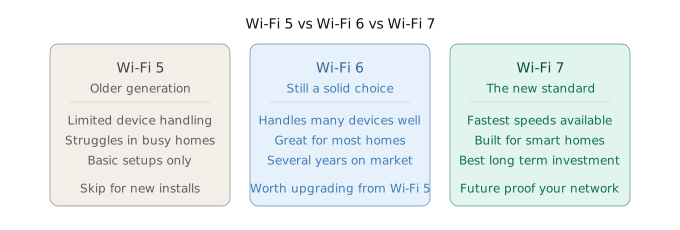
Wi-Fi 5 was a strong standard when it launched. For a home with a handful of devices and light usage, it did the job well.
The problem is that home networks today look nothing like they did when Wi-Fi 5 was introduced. The average household now runs dozens of connected devices simultaneously. Smart TVs, security cameras, thermostats, voice assistants, laptops, phones, tablets, gaming consoles, and smart home hubs all competing for bandwidth at the same time.
Wi-Fi 5 was not built for that kind of load. It struggles to handle multiple devices efficiently, and you feel that in the form of lag, buffering, and slower speeds during peak hours. If your home is currently running on Wi-Fi 5, it is worth understanding what you are leaving on the table.
You can check your current equipment’s Wi-Fi generation through the Wi-Fi Alliance’s certified product search or by looking up your router model directly.
Wi-Fi 6: Still a Strong Choice
Wi-Fi 6 was a major step forward and it remains a highly capable standard for most households today.
The key improvement was how Wi-Fi 6 handles multiple devices at once. It introduced technology that allows routers and access points to communicate with several devices simultaneously rather than one at a time. In a home with many active connections, that difference is real and noticeable.
Wi-Fi 6 also introduced better performance in congested environments, improved battery efficiency for connected devices, and faster throughput across the board. For most homes in the Chicagoland area and beyond, a properly installed Wi-Fi 6 system with wired access points delivers excellent whole home coverage.
That said, Wi-Fi 6 has now been on the market for several years. Which brings us to the conversation worth having before any new installation.
Wi-Fi 7: The New Standard
Wi-Fi 7 is the newest generation and it is becoming the new standard for professionally installed home networks.
The improvements over Wi-Fi 6 are significant. Wi-Fi 7 is faster, considerably more responsive, and built specifically to handle the demands of modern smart homes and the devices that come with them. It introduces multi-link operation, which allows devices to connect across multiple frequency bands simultaneously for more reliable, lower-latency performance.
For homes running eero systems, Wi-Fi 7 compatible hardware like the eero Max 7 represents the current flagship of that lineup and is built to take full advantage of what Wi-Fi 7 offers.
The most important reason to choose Wi-Fi 7 today is not necessarily that you need every bit of its performance right now. It is that Wi-Fi 6 has already been out for several years, and the technology cycle keeps moving. Investing in Wi-Fi 7 gives your home network a significantly longer useful lifespan before the next meaningful upgrade becomes necessary. That is the real value of the investment.
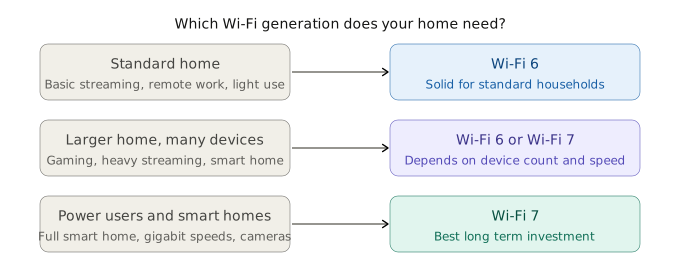
Which Generation Does Your Home Actually Need?
The Future-Proofing Argument Is Real
Here is the honest take on why Wi-Fi 7 makes sense as a starting point for any new installation right now.
If you are already going through the process of having a network professionally installed, the labor, the wiring, and the planning are the same whether you choose Wi-Fi 6 or Wi-Fi 7. The hardware cost difference between the two is meaningful but not dramatic, especially when you factor in that Wi-Fi 7 gives your investment a significantly longer runway before the next upgrade.
Choosing Wi-Fi 6 today is not a mistake. It is still a capable and reliable standard. But Wi-Fi 7 is becoming the default recommendation for new professional installations, and for good reason. You want a network that grows with your home and your devices, not one you are revisiting in two or three years.
If you want to run a quick speed test to see what your current setup is actually delivering, Speedtest by Ookla gives you a real-time read on what is coming in versus what your plan promises.
For a deeper look at how your home network fits together beyond just the Wi-Fi generation, check out our posts on what a wireless access point does, what a network switch is, and how much a whole home Wi-Fi system costs.
Serving Chicagoland Homeowners Who Want It Done Right
We install Wi-Fi 6 and Wi-Fi 7 systems in homes across Naperville, Aurora, Bolingbrook, and the broader western suburbs every week. The generation matters. So does the installation.
A Wi-Fi 7 system installed without proper wiring and access point placement will underperform a Wi-Fi 6 system that is installed correctly. The equipment is only part of the equation. The design and execution of the installation is the other half.
That is what we bring to every project.
Watch: What Is the Difference Between Wi-Fi 5, 6, and 7?
Bryan breaks down each generation in plain language, explains what actually changed between them, and tells you which one makes sense for your home right now.
Not Sure Which Generation Is Right for Your Home?
We will take a look at your current setup, your household usage, and your internet plan and give you a straight answer. No overselling, just the right recommendation for what your home actually needs.
👉 myguysknowhow.com