
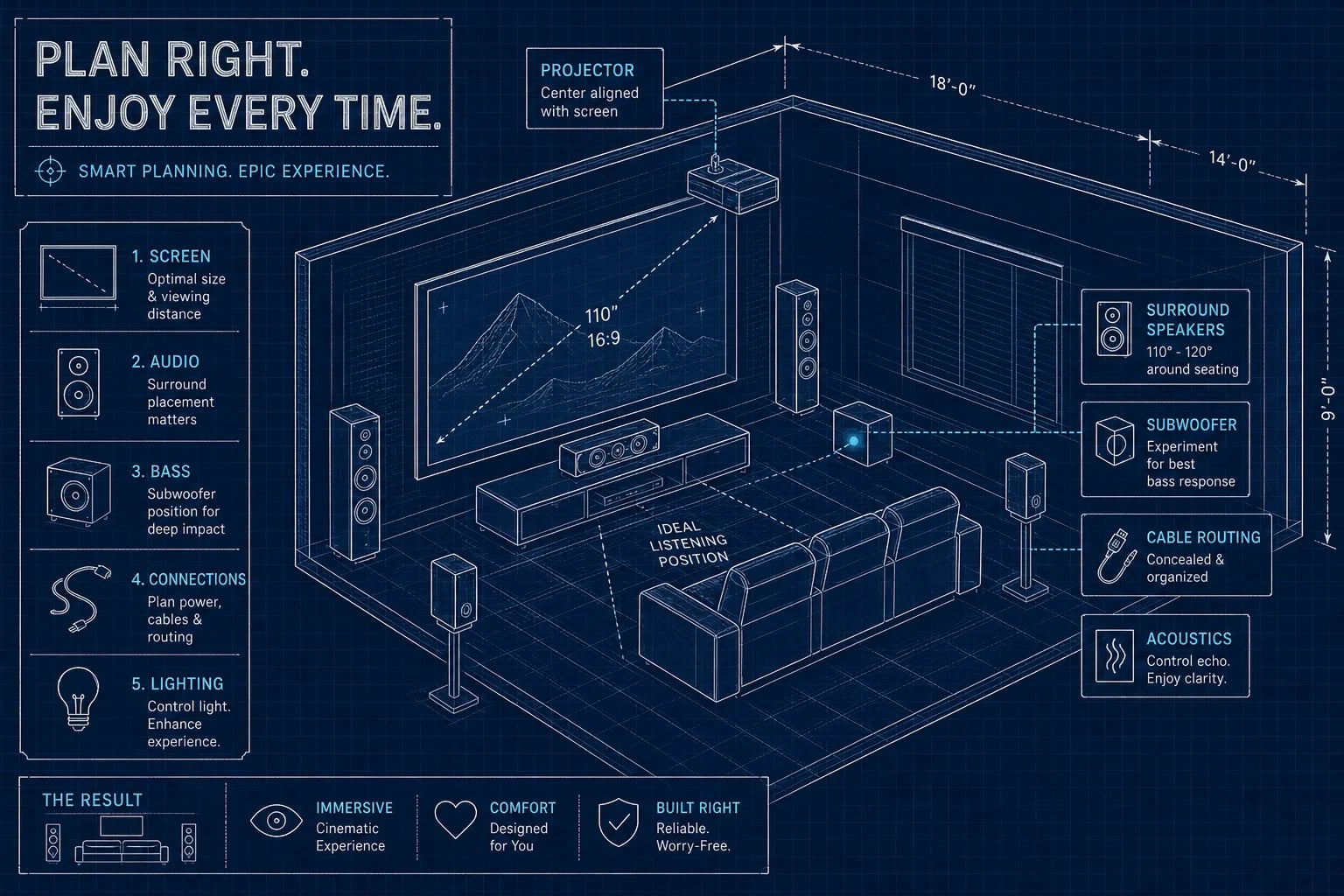
A successful home theater installation requires decisions in a specific order: room first, display second, audio third, wiring fourth, acoustics fifth. Skip that sequence and you’ll buy a 120-inch screen for a room with eight-foot ceilings, or wire speakers you physically cannot reach once the drywall goes up. Whether you’re finishing a basement, converting a spare bedroom, or building a true dedicated cinema, the decisions chain together tightly. Getting one wrong forces a redo of the next.
This guide covers each decision with the specifics you actually need. It’s built on the same hard-won knowledge we draw on at My Guys Know How when we design and install home theaters across Naperville, the western suburbs of Chicago, and the surrounding Midwest. The advice applies whether you go DIY or hire a professional team.
Key takeaways
- Room before gear: Screen size, speaker placement, and projector throw distance all depend on your room dimensions. Measure first, shop second.
- Light control is structural: Blackout shades and dark matte walls are construction decisions, not accessories. Plan them before drywall.
- 4K is the baseline: Any new installation should start with 4K. At typical seating distances, 8K offers no visible improvement unless the screen exceeds 85 inches.
- Wire before finishing: In-wall speaker wire, HDMI conduit, and subwoofer cable runs are a primary reason to involve a professional before drywall closes.
- Acoustics beat equipment: An untreated room with good speakers sounds worse than a treated room with modest ones. Budget for treatment alongside gear.
- Calibration is not optional: Proper AVR setup, room correction, and speaker-level matching after installation make the difference between a system that measures well and one that actually sounds great.
What room should you build your home theater in?
Basements are a common choice, and for good reason: natural light control and acoustic isolation from the rest of the house come built in. The catch is low ceilings. Anything below nine feet starts to complicate projector placement, Dolby Atmos speaker angles, and seating riser design. If the ceiling is eight feet or under, a flat-panel TV becomes a smarter display choice than a projector in most cases.
Dedicated rooms on upper floors give you more design freedom, but they require more acoustic work and often need soundproofing between floors. Open living spaces are the hardest case: ambient light, reflective surfaces, and sofa arrangements fight against both image quality and clean audio. In many open living spaces, a bright high-contrast TV is a more practical choice than a projector; similarly, well-positioned and calibrated 5.1 or soundbar setups can outperform poorly treated installations with expensive hardware.
Room dimensions set every downstream decision. A 12×18-foot room is the sweet spot for a single-row dedicated theater. Rooms under ten feet wide limit surround speaker placement and create bass buildup problems that EQ can only partially fix. Rooms over twenty feet may need additional amplification or a second seating row with a raised platform. Know your actual dimensions before you look at a single product page.
Light control is not a finishing touch. Even high-end projectors suffer severe contrast loss in ambient light, the kind that turns a cinematic image into something flat and washed out. For flat panels, glare causes the same problem. Dark matte paint on walls and ceiling, blackout shades on any windows, and careful attention to light bounce from the ceiling are construction decisions. Address them before the room is finished, not after the equipment arrives.
Home theater installation: how to pick the right display
TVs are brighter, simpler to calibrate, and perform well in rooms with some ambient light. Projectors deliver a larger image for less money at scale, but they need a dark room and careful planning around throw distance and screen placement. The choice usually comes down to room light control, ceiling height, and image size target.
Screen size follows viewing distance. For a cinema-style experience at roughly 40 degrees of field of view, your viewing distance should be approximately 1.2 times the screen diagonal. For relaxed mixed-use viewing at 30 degrees, it’s about 1.6 times the diagonal. The table below gives practical targets across room sizes and resolutions.
| Room / viewing distance | 1080p | 4K | 8K |
|---|---|---|---|
| Small room, 6–8 ft | 40–50 in | 55–65 in | 65–75 in |
| Medium room, 8–10 ft | 50–60 in | 65–75 in | 75–85 in |
| Large room, 10–12 ft | 55–65 in | 75–85 in | 85–100 in |
| Home theater, 12–15 ft | 65–75 in | 85–100 in | 100 in or projector |
4K is the baseline for any new home theater installation. At standard home-theater seating distances, 8K provides no visible benefit unless the screen is over 85 inches and seating is unusually close. 1080p still works in smaller rooms under eight feet of viewing distance but is increasingly difficult to source in larger panel sizes. If you’re starting fresh in 2026, start at 4K and don’t look back.
Speaker layout that actually fills the room
5.1 is the right call for most rooms under twelve feet wide: front left, center, front right, two surrounds, and a subwoofer. This configuration handles the large majority of content well and keeps placement manageable. Front left and right speakers should sit at roughly 22 to 30 degrees from the listening position. The center goes directly above or below the screen at ear height. Surround speakers belong at 110 to 120 degrees from the listener, raised approximately 0.3 to 0.6 meters above seated ear height.
7.1 adds rear surrounds and makes sense when seating is positioned away from the rear wall, giving you room to place speakers behind the listening position at 135 to 150 degrees. In that case, stick with 5.1 and place surrounds to the sides.
Dolby Atmos adds height channels, in a 5.1.2 or 7.1.4 configuration, via in-ceiling speakers or up-firing modules. In-ceiling speakers deliver more precise overhead localization because they use a direct path to the listener. Up-firing modules reflect off the ceiling and work best with flat, reflective ceilings between roughly 7.5 and 14 feet high. For a dedicated theater where installation is practical, in-ceiling speakers are the better call. For a retrofit where cutting the ceiling isn’t an option, quality up-firing modules still deliver a genuine improvement over no height speakers at all.
For subwoofer placement, use the crawl method: put the sub in your primary seat, play bass-heavy content, then walk the perimeter of the room until you find the spot where bass sounds tightest and most defined. That’s where you put the sub. Set your AVR crossover at 80 Hz as the starting point before running room correction.
Wiring your home theater installation the right way
The AVR is the hub. Every source device connects to an AVR HDMI input. The AVR sends video to the display via its HDMI monitor output. The powered subwoofer connects via shielded RCA from the AVR’s LFE pre-out. Passive speakers wire to the AVR’s speaker terminals with consistent polarity: red to red, black to black. Reversed polarity weakens bass and degrades imaging in ways that are audible but easy to misattribute to the speakers or the mix.
Connection order matters. Power everything off first. Connect passive speakers, then the subwoofer via RCA from the LFE pre-out, then HDMI from the AVR monitor output to the display, then source devices into separate AVR HDMI inputs. Power-on sequence: display first, then AVR, then source devices. This prevents signal errors and keeps equipment protection circuits from triggering unnecessarily.
HDMI conduit and cable specs
HDMI 2.1 is required for 4K at 120Hz and eARC support. Industry testing typically shows no measurable improvement from expensive audiophile HDMI cables compared with certified mid-grade 2.1-rated cables. Spend that money on speaker placement instead.
Speaker wire gauge guidance
Use 14 AWG speaker wire for most home theater runs and 12 AWG for very long runs or low-impedance speakers. Subwoofer cable should be shielded RCA to prevent hum.
In-wall speaker wire, HDMI conduit, and subwoofer cable runs are a primary reason to involve a professional before drywall goes up, and one of the most overlooked planning steps we see. Retrofitting in-wall wiring in a finished room means cutting, patching, painting, and hoping a path exists. If the room is still framed, run conduit with pull strings now even if you’re not running cable today. For finished rooms, quality surface-mounted raceways are far cleaner than most people expect and dramatically cheaper than wall surgery. We handle both pre-drywall (new construction) and finished-room wiring scenarios.
Acoustic treatment: the upgrade most people skip
An untreated room with excellent speakers sounds worse than a treated room with modest speakers. Most homeowners learn this the expensive way. First-reflection points at the side walls create flutter echo and muddy dialogue. Bass buildup in corners makes the subwoofer sound boomy regardless of how much EQ you throw at it. Room correction software helps, but it cannot fully compensate for an untreated space.
Treatment priority order: start with broadband absorption panels at side-wall first-reflection points at ear height. Use two to four inches of rigid fiberglass or mineral wool (Owens Corning 703 is a common choice), fabric-wrapped, with a small air gap where possible. Add front-corner bass traps next, ideally floor to ceiling. Then a ceiling cloud above the main seating position. Rear-wall treatment comes last. Skip thin open-cell foam entirely: it handles only high frequencies and does nothing meaningful for bass or low-mid buildup.
Budget realities for a 12×16-foot room: a well-balanced DIY treatment package, six to ten broadband panels and front-corner bass traps, runs $500 to $1,000 (homeyou.com estimates). The goal is balanced absorption, not maximum coverage. Over-treated rooms sound artificially dead, which is its own problem.
Home theater installation: DIY vs. hiring a professional
Cost ranges in 2026 vary significantly by project scope.
Cost ranges sourced from homeyou.com and valerion.com. Complex custom work is typically project-priced.
Five areas where DIY home theater installation most commonly produces expensive mediocrity:
- In-wall wiring in finished rooms
- AVR room correction calibration
- Projector mounting and lens alignment
- Dolby Atmos speaker placement precision
- Smart home control integration
These aren’t cosmetic failures. They’re situations where everything looks installed but sounds or performs significantly below what the equipment is capable of delivering.
That’s exactly the kind of project we handle at My Guys Know How. We design, install, and calibrate home theaters as a single coordinated project: display mounting, in-wall wiring, speaker placement, receiver calibration, acoustic treatment integration, and smart home control, one crew, no vendor juggling, no finger-pointing between trades. We also rescue installs that went sideways, whether it was a DIY project that stalled or a previous installer who left before finishing the calibration.
Your home theater installation is only as good as the plan behind it
The decision sequence is the product: room dimensions first, display selection second, speaker layout third, wiring and conduit fourth, acoustic treatment fifth, and calibration after everything is in place. The gear list matters less than the order you make those decisions and the quality of execution at each step. A well-placed mid-range speaker in a treated room beats an expensive driver stuck in the wrong corner every time.
A successful home theater installation starts with the room plan, get it right before you buy gear. If you’re in Naperville, the western suburbs of Chicago, or the broader Chicagoland area and want one team to handle the complete project, reach out to us at My Guys Know How and we’ll walk through what your room actually needs. For those going the DIY route, use this guide as the checklist that prevents the most expensive mistakes. The room is ready when the plan is right, not when the box arrives.
Frequently Asked Questions
Should we run HDMI conduit now if we don’t plan to pull cable yet?
Yes, run conduit with pull strings while the room is framed even if you’re not running cable today. Doing so avoids cutting drywall later and makes future cable runs straightforward; for finished rooms, surface-mounted raceways are a far cleaner and cheaper retrofit option.
How should ceiling height affect our choice between a projector and a TV?
Ceiling height is a key deciding factor: ceilings below nine feet start to complicate projector placement, and ceilings eight feet or under usually make a flat-panel TV the smarter choice. Projectors work best in dark rooms with adequate throw distance and higher ceilings, while TVs are brighter and handle some ambient light and lower ceilings better.
What HDMI cable do we need to support 4K at 120Hz and eARC?
Use HDMI 2.1-rated cable to support 4K at 120Hz and eARC. Industry testing shows certified mid-grade 2.1 cables perform as well as expensive audiophile options, so spend on proper speaker placement instead of high-end HDMI cables.
When should we involve a professional instead of doing it ourselves?
Involve a professional before drywall goes up for in-wall wiring and whenever the project includes tasks where DIY commonly produces expensive mediocrity. Typical professional-worthy items include in-wall wiring in finished rooms, AVR room-correction calibration, projector mounting and lens alignment, Dolby Atmos speaker placement precision, and smart home control integration.